


Rolly Legs
4.43.69K Reviews
App Specs
- Version
- 3.02
- Updated On
- License
- Free
- Downloads
- 10,000,000+
- Developer
- VOODOO
- Categories
- Arcade
- Platform
- Android
Screenshots
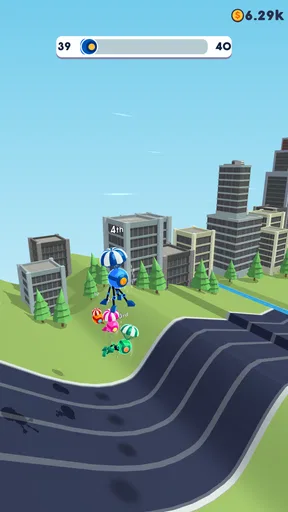
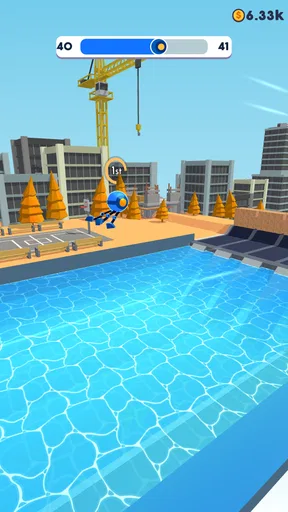
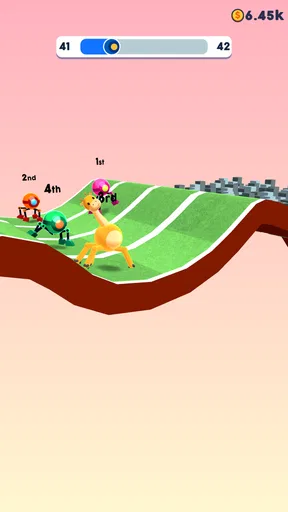
 Analysis by AppCompare
I picked up Rolly Legs expecting a quick arcade distraction, and that is exactly where it works best: short sessions built around controlling a robot through awkward, satisfying movement. The basic idea sounds simple, but the game asks for more care than its compact presentation suggests. You guide the robot as it rolls, walks, and climbs toward the finish, adjusting your movement when the ground, slopes, and obstacles stop behaving like a smooth track.
What makes it worth discussing is not a large collection of menus or a deep story. It is the small gap between seeing the route and actually handling the robot well. I often knew what I wanted to do but still had to learn when to make a correction, when to let the robot roll, and when a rushed input would leave me in a worse position. That makes it a natural fit for quick arcade play, though not necessarily for someone looking for a long-form game with extensive progression.
VOODOO presents it as a free game for everyone, and its broad appeal is easy to understand. It is simple to start, available for Android devices running at least Android 8.0, and the listing shows more than ten million installs. Its average rating is 4.4 from roughly 124 thousand ratings, which matches my impression that the central control idea is immediately accessible even if polished play takes practice.
Where players usually get stuck
The first difficulty is learning that the robot’s movement is not something I can treat like a conventional racing game. I cannot simply hold a direction and expect every section to reward speed. Rolling is useful when the path is open, but climbing and walking demand more deliberate timing. A movement that looks harmless at the start of a slope can become a bad approach a moment later.
I found the most common mistake was reacting to the robot’s position instead of looking at the next piece of terrain. By the time the robot is visibly leaning or drifting, the useful moment for correction may already have passed. I had better results by watching the shape of the route ahead and making smaller adjustments before the robot reached a change in elevation.
That is an important distinction for new players. The game is not difficult because the objective is unclear; it is difficult because the controls reward anticipation. If you keep making large corrections after the robot has already started moving badly, the result can feel random. It is usually a sign that the input came too late or was held too long.
Another point of friction is the difference between a failed attempt caused by control and one caused by poor positioning. When I approached a climb from an awkward angle, trying to rescue the robot at the last second was rarely effective. Restarting the attempt mentally, choosing a cleaner line, and using less input was often more productive than fighting the same mistake.
Worth Reading Before You Choose

EA SPORTS FC Mobile 26 Is a Bigger Football Game, but It Takes Time

Flipboard Shows What News Apps Must Do Beyond the Feed

Switching to Android Auto Means Rethinking Your Driving Routine

Google Calendar Makes a Crowded Week Easier to Manage

Ludo King Makes the Most of the Minutes Between Plans

Baby Panda World Brings Quick Play to Modern Phones, but Its Game Library Feels Busy
The useful mindset is to treat every section as a positioning problem before treating it as a speed problem. That single change makes the game feel less frustrating. I stopped asking, “How do I move faster?” and started asking, “Where should the robot be when the next surface begins?”
Why a simple control can still feel demanding
Arcade games often rely on immediate reactions, but this one also tests restraint. The robot’s different ways of moving create a rhythm: rolling can carry momentum, walking can help manage uneven ground, and climbing calls for a more careful approach. I did not need a complicated control scheme to notice the difference. I needed to stop assuming that one input style would work everywhere.
That gives the game a pleasant learning curve in short bursts. A failed run can teach me something concrete, such as approaching a rise more centrally or releasing an input earlier. The limitation is that the experience remains focused on this one movement challenge. Players who need a wide range of mechanics may find the repetition less rewarding once the novelty of the robot wears off.
It is also worth remembering that a compact arcade game can expose device-related problems more clearly than a slower game. A delayed touch, an accidental gesture, or an unstable frame rate can turn a manageable section into a failure. Before deciding that the controls are poor, I would check whether the phone is responding consistently in other touch-based games or apps.
Setup checks before blaming the game
Getting started should be straightforward because the game is free to download and aimed at an Everyone audience. Still, I would begin with the basics: make sure the phone is running Android 8.0 or newer, leave enough free storage for installation and updates, and use a stable connection while downloading. The current version listed for the game is 3.02, so checking that the installed build is current is a sensible first step if something behaves unexpectedly.
I would also close demanding apps before playing, especially on an older phone. This is not because Rolly Legs requires a complicated setup, but because arcade control depends on consistency. If another app is using significant memory or the device is already warm, touch response and smoothness may suffer. A short restart can be more useful than repeatedly retrying the same section.
Touchscreen habits matter more than I expected. Playing while the phone is charging, using a thick case that interferes with edge gestures, or resting a finger too close to another control area can create inputs that feel like game errors. I prefer holding the phone securely with one hand and keeping the active finger free to make short, intentional movements rather than dragging continuously.
If the game opens but does not respond correctly, I would first leave it completely and reopen it. If that does not help, restarting the phone is the next low-risk check. I would avoid clearing saved information casually, because a troubleshooting step should not create a separate problem. Reinstalling is better treated as a later option, after confirming that the issue is not caused by the device, the connection, or an interrupted update.
The game is free, but in-app purchases are listed at $3.49 per item. That matters when setting expectations for a child’s device or a shared family phone. I would review purchase controls before handing the device over, not because the game is unsuitable for younger players, but because “free” does not automatically mean that every optional transaction is blocked.
A practical first-session routine
My preferred setup is simple. I play in a quiet moment, keep the screen clean, and give myself a few attempts without trying to rush toward a perfect run. The first session is more useful when I focus on learning how the robot transitions between rolling, walking, and climbing instead of treating every failure as a score to beat.
For a child, I would explain the goal in plain language: look ahead, make small corrections, and do not panic when the robot starts to tilt. That advice is more helpful than telling them to move quickly. For an adult using the game during a commute or a short break, the same approach prevents a two-minute session from becoming an irritating sequence of rushed retries.
If the game seems visually or physically unresponsive after an update, I would compare its behavior with another app that uses touch input. That comparison helps separate a game-specific problem from a phone-wide issue. It is a small diagnostic habit, but it saves time and avoids changing settings unnecessarily.
Recovering a disrupted workflow
Rolly Legs is designed around repeated attempts, so recovery is part of the experience rather than an unusual event. When I fail, I try to identify the last decision that mattered. Was I already too far to one side? Did I hold the input after reaching the top of a slope? Did I enter a climb without enough control? Naming the mistake gives the next attempt a purpose.
A useful recovery method is to divide the route into visual moments. I concentrate on the approach, the transition, and the landing rather than thinking about the entire course at once. This makes the robot easier to manage because I am preparing for the next surface instead of reacting to everything on screen simultaneously.
I also avoid changing several things at once. If the robot falls because I overcorrected, I use a smaller correction on the next attempt while keeping the approach similar. If I change speed, direction, and timing together, I cannot tell which adjustment helped. This is a small technique, but it turns retries into practice instead of repetition.
When the game is interrupted by a notification or an accidental exit, I would return calmly rather than immediately repeating the same input pattern. Check whether the device has returned to normal touch response, then begin again with a clean attempt. If the game appears frozen, close and reopen it before trying more complicated fixes.
One trade-off is that this restart-and-learn structure will appeal to some players and annoy others. I like it when I have five spare minutes and want a focused challenge. I would not choose it when I am already impatient or when I need a game that preserves a long, detailed session. Its strength is the clarity of one more attempt; its weakness is that the same clarity can feel narrow over time.
How to make short sessions feel worthwhile
I get more from the game when I set a small goal for each session. One time I focus on smoother approaches. Another time I try to reduce unnecessary corrections. This is better than demanding immediate success, especially because the robot’s movement is easy to understand but not always easy to execute.
It also helps to stop after a genuinely frustrating run instead of continuing automatically. Because the game is free and quick to launch, it is easy to keep retrying without improving. A short break can reset attention, and returning later often makes the same section feel more readable.
For casual players, the game works as a compact reflex-and-control exercise. For more competitive arcade fans, the appeal depends on whether they enjoy refining movement in a limited format. Compared with endless runners, it feels less focused on simply surviving a stream of hazards and more focused on handling the robot’s changing movement. Compared with physics-heavy puzzle games, it is faster to understand and less interested in elaborate problem solving.
When the app is not the cause
Not every failed run points to a software problem. If the robot responds consistently but repeatedly falls at the same place, the cause is probably technique. I would test a gentler input, a different approach angle, or an earlier release before reinstalling anything. A genuine app issue is more likely when the game stops responding, closes unexpectedly, or behaves differently from one launch to the next.
Device performance can also be misleading. If other games stutter, the phone is overheating, or the screen is missing touches outside Rolly Legs, the sensible fix is broader than changing this game. Closing background apps, cooling the device, and restarting it are reasonable first checks. If only this game is affected, then updating or reinstalling may be worth considering, but I would protect any important device data before taking disruptive steps.
Connection problems can affect downloading or updates, but they should not be confused with a player simply missing a climb. I would separate installation trouble from gameplay trouble: first confirm that the game opens normally, then test touch response in a calm section, and only after that investigate the route itself.
The Everyone rating makes it easy to recommend the game as a family-friendly arcade option, but supervision around purchases is still sensible. The listed optional items cost $3.49 each, so parents should use the device’s purchase safeguards if children play on a shared account. That is a practical consideration rather than a criticism of the core game.
Players who want a richer alternative should look elsewhere. If your priority is a large campaign, character development, online competition, or a broad collection of modes, this is not the right choice. A traditional platformer may offer more deliberate level design, while an endless runner may provide a stronger feeling of constant forward momentum. Rolly Legs is better for someone who enjoys mastering a small movement idea through repeated, quick attempts.
My practical verdict after using it
I recommend Rolly Legs to anyone who likes compact arcade games where control improves through observation and repetition. The robot is easy to understand, but its movement gives the game enough texture to keep the first sessions from feeling completely automatic. I especially like it as a short-break game because I can start quickly, play a few attempts, and stop without committing to a long story or complicated setup.
Its biggest limitation is also its identity. The experience is tightly focused, so players who need variety may run out of interest. Some failures can feel unfair until the timing becomes familiar, and the game offers less value if you dislike repeating a route to refine a small movement decision. I would skip it if you want deep progression or a game that constantly introduces new systems.
For everyone else, the free entry point makes trying it easy, while the broad install base suggests it has reached a substantial audience. VOODOO keeps the concept direct rather than burying it under menus. On Android, the requirement of Android 8.0 or later is reasonable for many current devices, and the current 3.02 version is the one I would look for when checking that my installation is up to date.
My final advice is to give it a patient first session. Do not judge the game by the first few awkward climbs, and do not assume that faster input is better input. Watch the next surface, approach with a stable line, and make the smallest correction that can solve the problem. Once I played that way, the robot’s failures became useful feedback instead of random annoyance.
Overall, Rolly Legs is a focused arcade game with a clear audience: people who enjoy quick retries, tactile movement, and the satisfaction of gradually making a tricky route look easy. I would keep it installed for short sessions, but I would pair it with a more varied game if I wanted a deeper daily experience. Its best quality is the way a very small idea can create a surprisingly precise challenge; its main weakness is that the same narrow focus will not suit everyone.
Pros
- Simple one-touch controls are easy for beginners to understand.
- Short levels make it suitable for quick gaming sessions.
- Unlockable skins add some visual variety to the runner.
- The colorful 3D graphics are clear and appealing on mobile screens.
- Offline play lets you enjoy it without a constant internet connection.
Cons
- Gameplay can feel repetitive after playing several levels.
- Frequent ads may interrupt the experience
- especially between rounds.
- Progression offers limited depth for players seeking long-term challenges.
- Some obstacles rely on timing that can feel inconsistent at times.
- The game may become frustrating when later levels increase difficulty sharply.
FAQs for Rolly Legs
What is Rolly Legs and how do you play it?
Rolly Legs is a casual arcade game centered on guiding a rolling character through obstacle-filled tracks. You control its movement, usually by tapping or holding the screen to extend legs, climb over surfaces, and maintain balance. The main objective is to reach the finish line while avoiding hazards, collecting useful items, and completing each course as efficiently as possible.
Is Rolly Legs free to download and play?
Rolly Legs is generally available as a free download, allowing players to try the main gameplay without paying upfront. However, the experience may include advertisements, optional purchases, or cosmetic upgrades depending on the platform and current version. Before downloading, it is worth checking the app-store listing for pricing details, in-app purchases, and any regional differences.
Does Rolly Legs require an internet connection?
Rolly Legs is designed primarily as a quick, casual game, so many of its core levels can typically be played without a constant internet connection. Nevertheless, internet access may be required for advertisements, updates, cloud-related features, or restoring purchases. If you want to play offline, open the game after installation and test the available content with mobile data and Wi-Fi disabled.
Is Rolly Legs suitable for children?
Rolly Legs uses simple controls, colorful visuals, and straightforward obstacle courses, making it accessible to younger players and casual gamers. Even so, parents should review the age rating, advertising content, and in-app purchase settings before allowing children to play. Difficulty can increase as the courses become more demanding, but the game does not generally require advanced gaming experience.
What devices are compatible with Rolly Legs?
Rolly Legs is available for supported Android and iOS devices through their official app stores. Compatibility depends on the operating-system version, device hardware, available storage, and the requirements specified by the developer. For the smoothest experience, use a relatively recent phone or tablet with updated software, and download the game only from an official store to avoid unsafe or modified versions.


